Knowledge Base
How to Update TXT and SPF Records - DNS Management
How To Update TXT/SPF Records
If you do not see the DNS option, please chat with one of our agents and have them add Custom DNS Records to your account.- Log in to your Control Panel.
- Go to Domain Central.
- Click on the domain you want to edit.
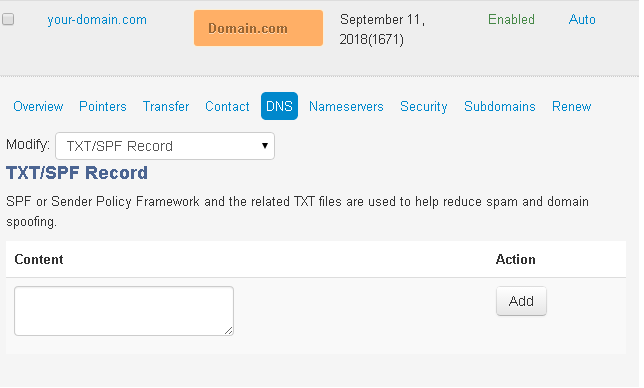
- Click DNS.
- From Modify, select TXT/SPF Records.
- Type the TXT/SPF Record into the Content textbox.
- Click Add to add the TXT/SPF Record. A confirmation message will appear.
- To modify a setting, select Edit or Remove from the Action dropdown menu next to the A Record.
- The content for TXT/SPF records will look something like the sample below:
v=spf1 ip4:66.96.128.0/18 ?all
Did you find this article helpful?