Knowledge Base
Categories: MySQL
Database: How To Repair And Optimize Your Database
How To Repair And Optimize Your Database (MySQL)
- Log in to your Account Support Control Panel.
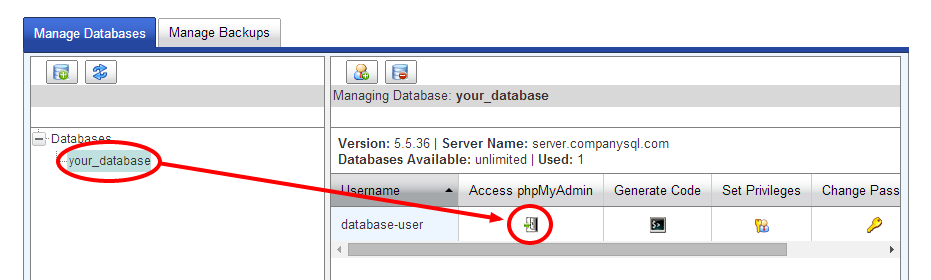
- Go to MySQL Database.
- Select the database you want to optimize.
- Click Access phpMyAdmin.
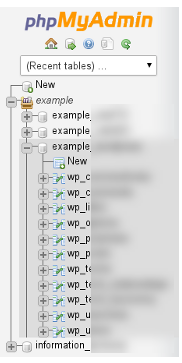
- Click on the database name.
- Check each database table that you want to repair.
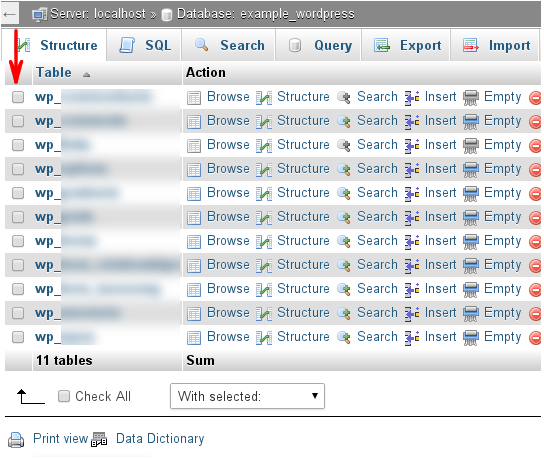
- Select Repair table in the With Selected list box. phpMyAdmin will notify you whether or not the repair process is successful.
Important: As soon as you click on an option within the dropdown menu, the action is taken immediately. We recommend that you exercise extreme care to ensure that you do not accidentally delete (Empty, Drop) your database tables!
Did you find this article helpful?